I've bought a hybrid edition, how do I activate my access?
- If you have purchased the hybrid edition, the code you need to enter can be found in the manual:
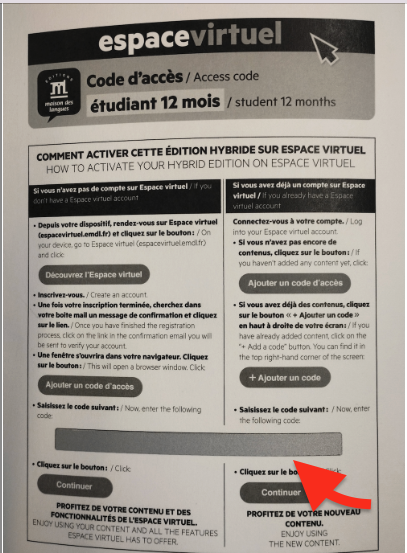
When you open the book, on the back cover, you'll find all the information you need to access the Espace Virtuel platform, as well as the access code, as you can see in the screenshot below.
You need to scratch the silver-gray field shown in the screenshot below to see the code.
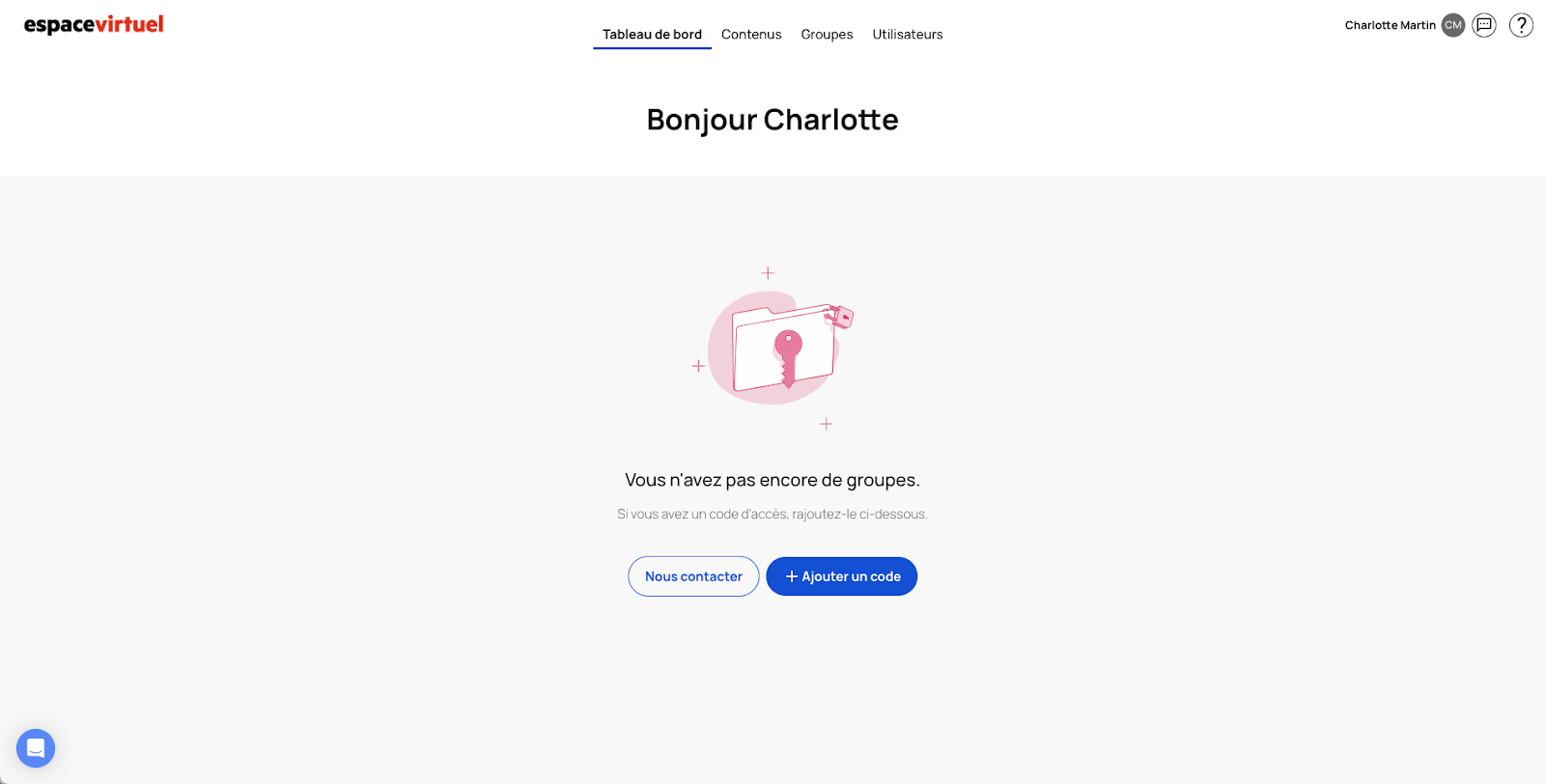
To activate the content, you need to click on the Contents tab, then on the blue + Add code button and enter the code.
To activate the content, click on the Contents tab, then on the blue + Add code button and enter the code.
If the page mentioned later does not appear in your book, you have probably only purchased the printed manual (without an access code for all the digital content):
- If you have purchased only the printed manual, to activate the free resources associated with the manual (audio tracks, videos, etc.), you need to enter the ISBN code on the back of the book.
To activate the content, click on the blue + Add code button, and enter the ISBN code you'll find at the back of the student's book.

Do not add any spaces, hyphens or other punctuation marks between the numbers in the barcode.
No need to enter exercises textbook ISBN code. By entering the student textbook ISBN code, you have already activated all available resources for both on your profile.
The access to the free digital resources of your book (audio, videos, transcriptions, etc.) activated with the ISBN code of the printed textbook will last for 31 days.
However, as long as the textbook is still available for sale and therefore still available on the platform, you can reactivate the access to the content as many times as needed by entering the ISBN code again..
If you already have contents activated or expired on your account, to activate the content, click on the Contents tab, then on the blue + Add code button, and enter the ISBN code you'll find at the back of the student's book.
Related Articles
I bought a hybrid edition and haven't received my access code.
For hybrid editions, you will find the code inside the book. You will have to wait to receive it before you can validate it on your Espace virtuel account. You will find your access code on the internal part of the cover. It is a 20-character code ...I have purchased a hybrid edition but I cannot activate the contents with the ISBN code
The access code you need to enter is not the ISBN code. - If you have purchased the hybrid edition, the code you need to enter can be found in the manual: When you open the book, on the back cover, you'll find all the information you need to access ...I bought a hybrid edition and haven't received my access code.
For hybrid editions, you will find the code inside the book. You will have to wait to receive it before you can validate it on your Espace virtuel account. You will find your access code on the internal part of the cover. It is a 20-character code ...Buy a hybrid edition: list of hybrid editions available by method and level (Printed textbook + 12-month digital textbook access code)
Hybrid edition: Printed textbook + 12-month digital textbook access code The Hybrid Edition includes the printed student's book and a 12-month access code to all textbook and workbook digital resources. To check all the digital accesses available for ...Buy a digital access or a hybrid edition of the DELF preparation course
Click here to see the digital accesses and hybrid editions available for each level.